Skip to content

iPhone app · web app · AI assistant access

Track every lift and meal on iPhone and the web.

Log every set from your iPhone or your browser, signal or not. UA Strength brings your lifts, your meals and your Apple Health data together. With UA Strength Premium, AI assistants like Claude can read your data and log meals for you.

  • iPhone app in beta on TestFlight
  • Web app in any modern browser
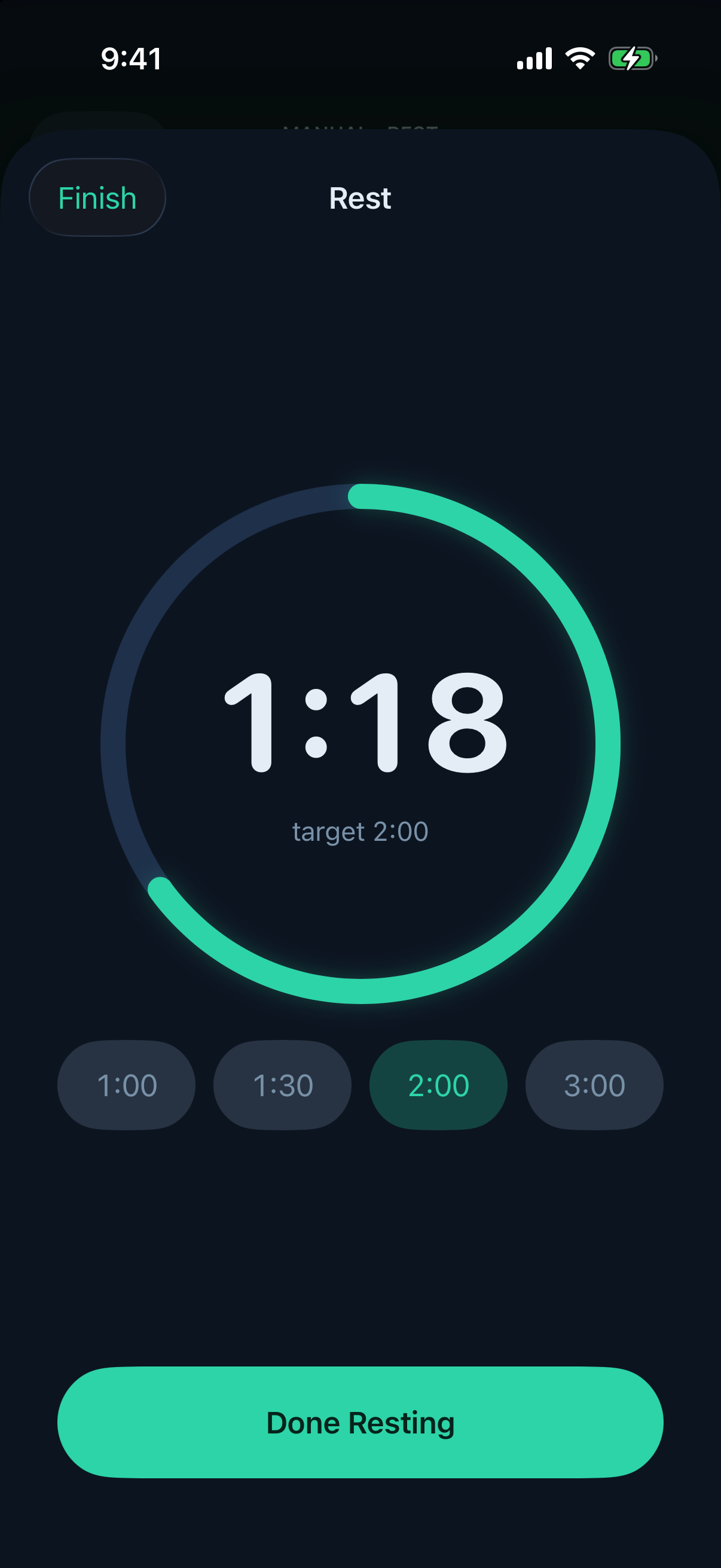
Rest timer between sets at 1:18, its ring two thirds of the way to a two-minute target, with 1:00, 1:30, 2:00 and 3:00 presets
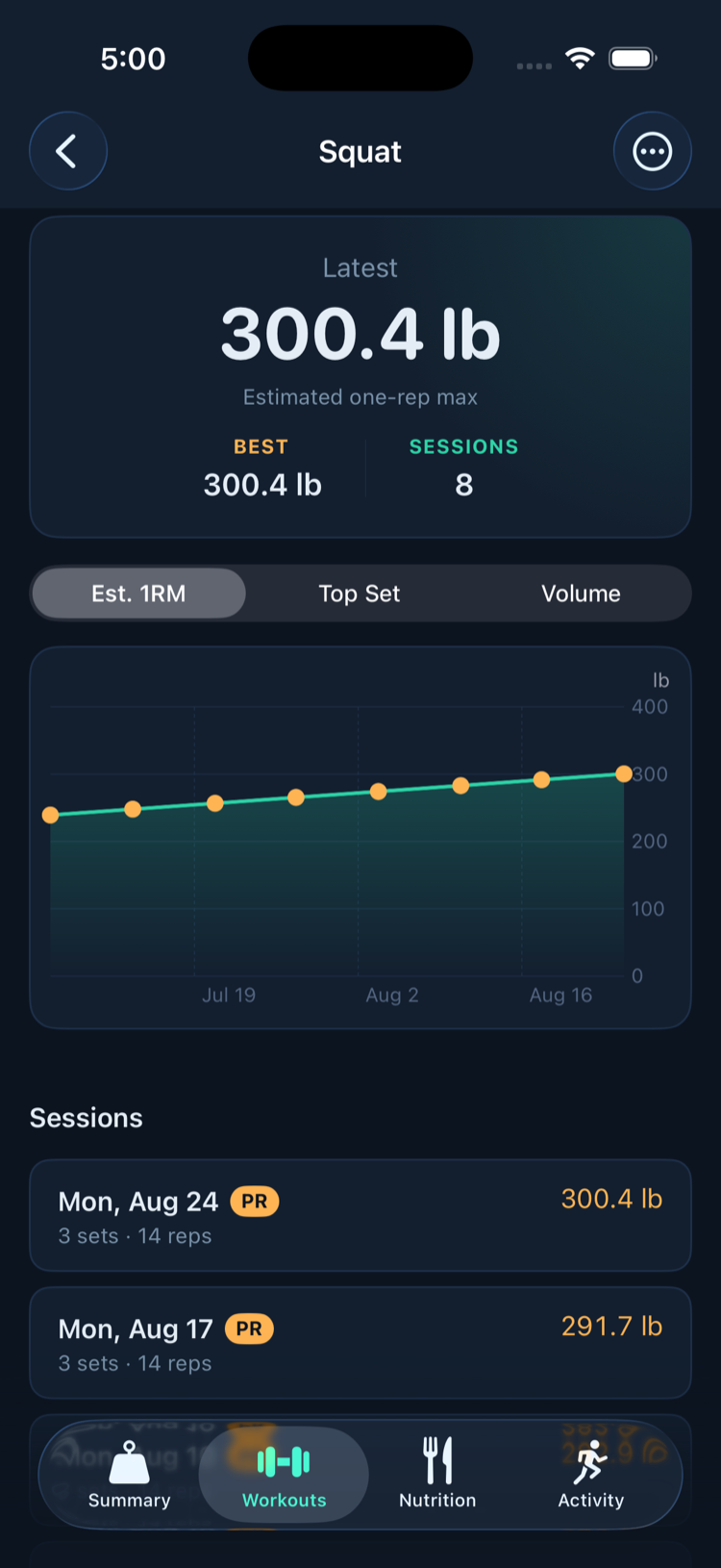
Squat detail charting estimated one-rep max over eight weeks with personal records marked, above the heaviest weight lifted for 1, 5, 8 and 10 reps
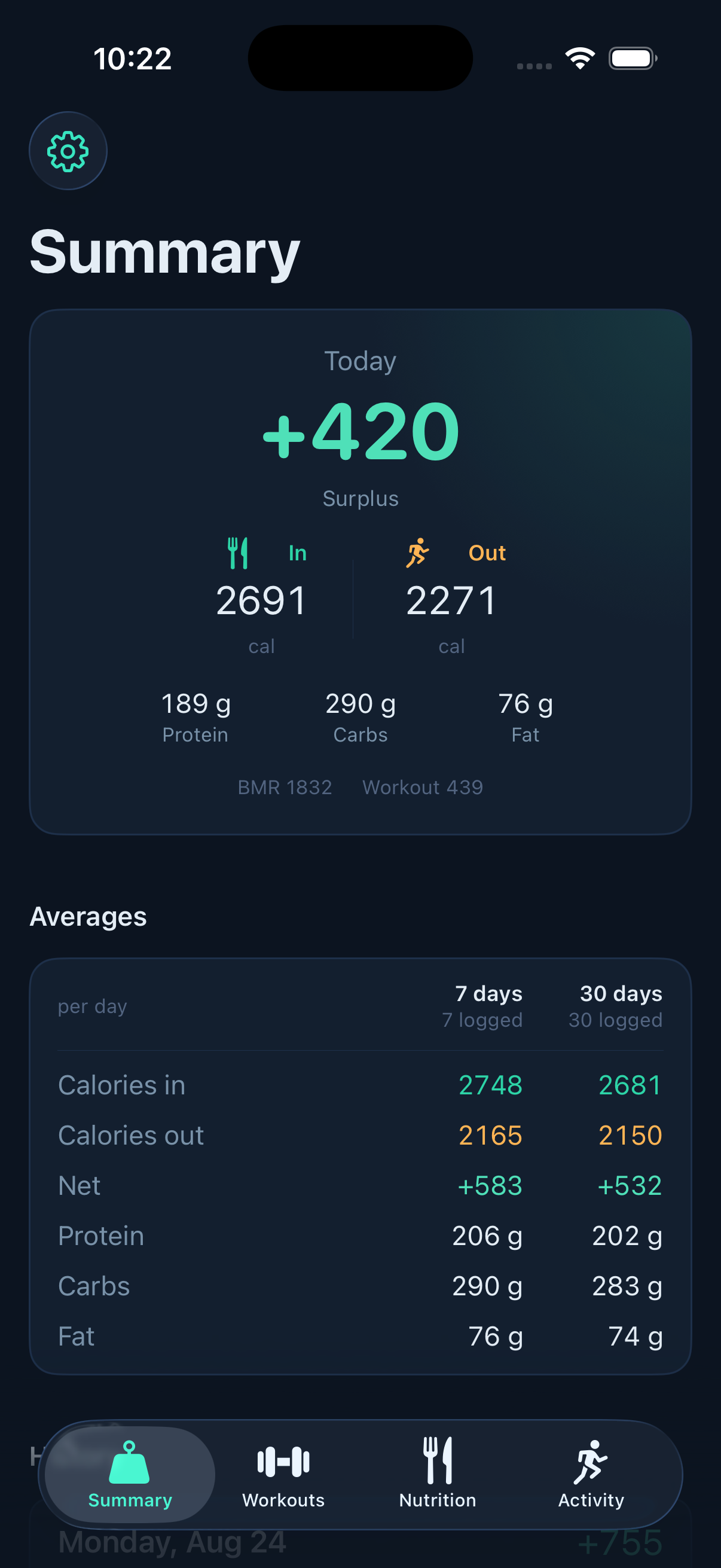
Daily energy balance: calories in, calories out, the day's macros, and 7- and 30-day averages
iPhone and webA native iOS app and a complete web app on one account.
Offline firstLog with no signal. Everything syncs when you are back online.
Apple Health built inSleep, heart health, workouts and weigh-ins arrive without typing.
Ready for AI assistantsPart of UA Strength Premium. An MCP server and OAuth 2.1, with every agent change undoable.

What it does

Training, food and recovery in one place.

Everything below ships today, in the iPhone app, the web app, or both. Live set analysis is still in testing.

iPhone and web

Training log

Made for logging between sets, not from memory after the workout.
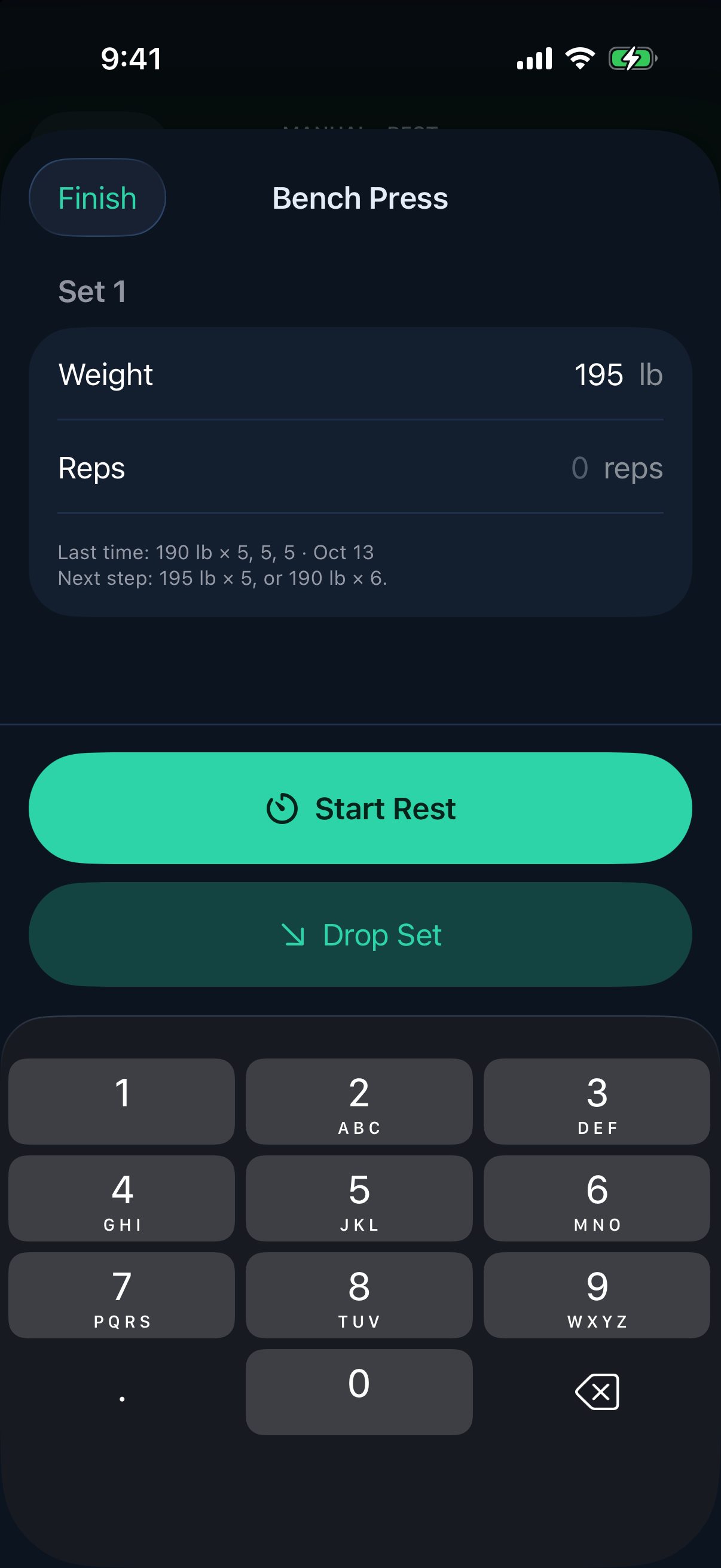
Entering a set of bench press at the gym: 195 lb typed in, and under the fields last time's 190 lb for three sets of 5 on Oct 13 and a next step of 195 lb for 5 or 190 lb for 6
At the gym: enter the weight, then the reps. Under them, what you did last time and one step up from it.
Rest timer between sets at 1:18, its ring two thirds of the way to a two-minute target, with 1:00, 1:30, 2:00 and 3:00 presets
Rest between sets. The ring fills as the timer counts toward your target.
  • Guided gym mode

    Enter the weight, then the reps, then rest, one step at a time. A rest timer counts toward your target and lets you know when it is time to go again.

  • Last time and next step

    While you log a lift you have done before, the app shows what you did last time and one step up from it. It works with no signal.

  • Repeat a workout

    Start from a workout you have done before. Its exercises come back in the order you did them, and each new set starts at the weight it had last time.

  • Rest on the lock screen

    On iPhone, a rest also shows on the lock screen and in the Dynamic Island, with the clock running and your target beside it.

  • Supersets and drop sets

    Pair two exercises and alternate them in rounds, resting after each full round. A drop set stays attached to the set it continues.

  • Log by hand

    Prefer to type it in afterwards? Log only mode skips the timer and the guided steps.

  • Gyms

    Tag each workout with where you trained, set the gym on past sessions in bulk, and compare a lift across gyms.

  • A tidy history

    Rename a lift or merge two names into one across your whole history, so “Bench” and “Bench Press” count as the same exercise.

  • Bring your history

    Import your workouts from Strong or Hevy. Choose the file the other app exports and see what it holds before anything is added. Importing the same file twice adds nothing.
iPhone and web

Progress you can measure

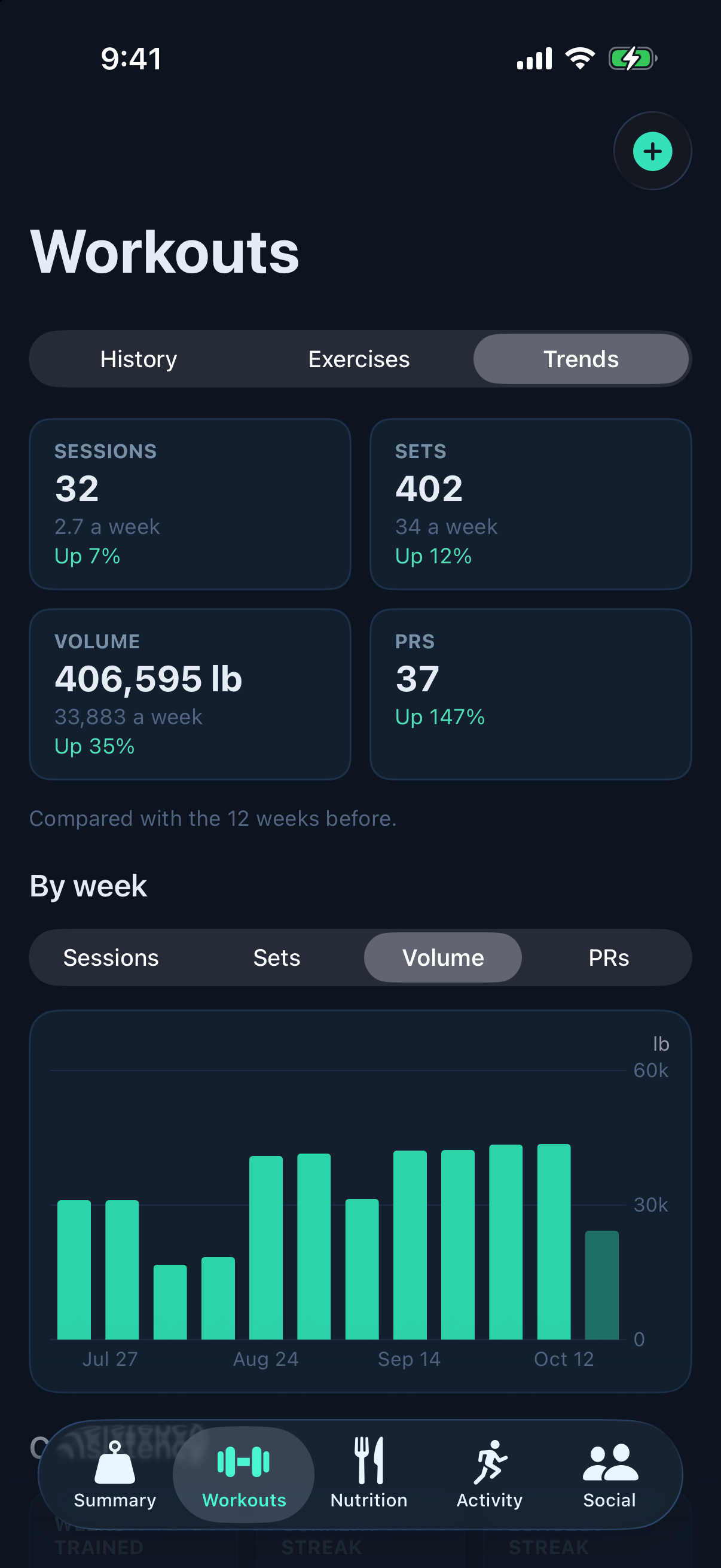
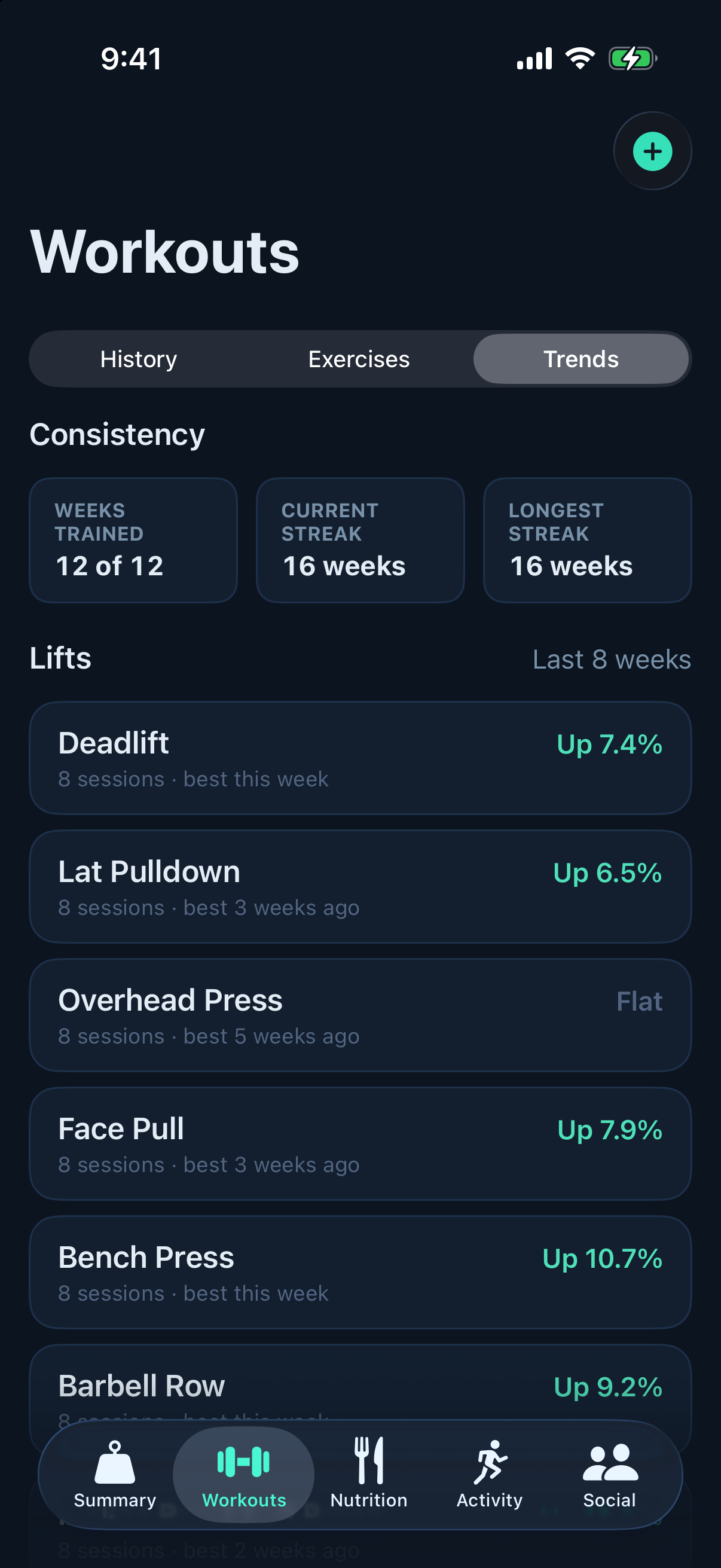
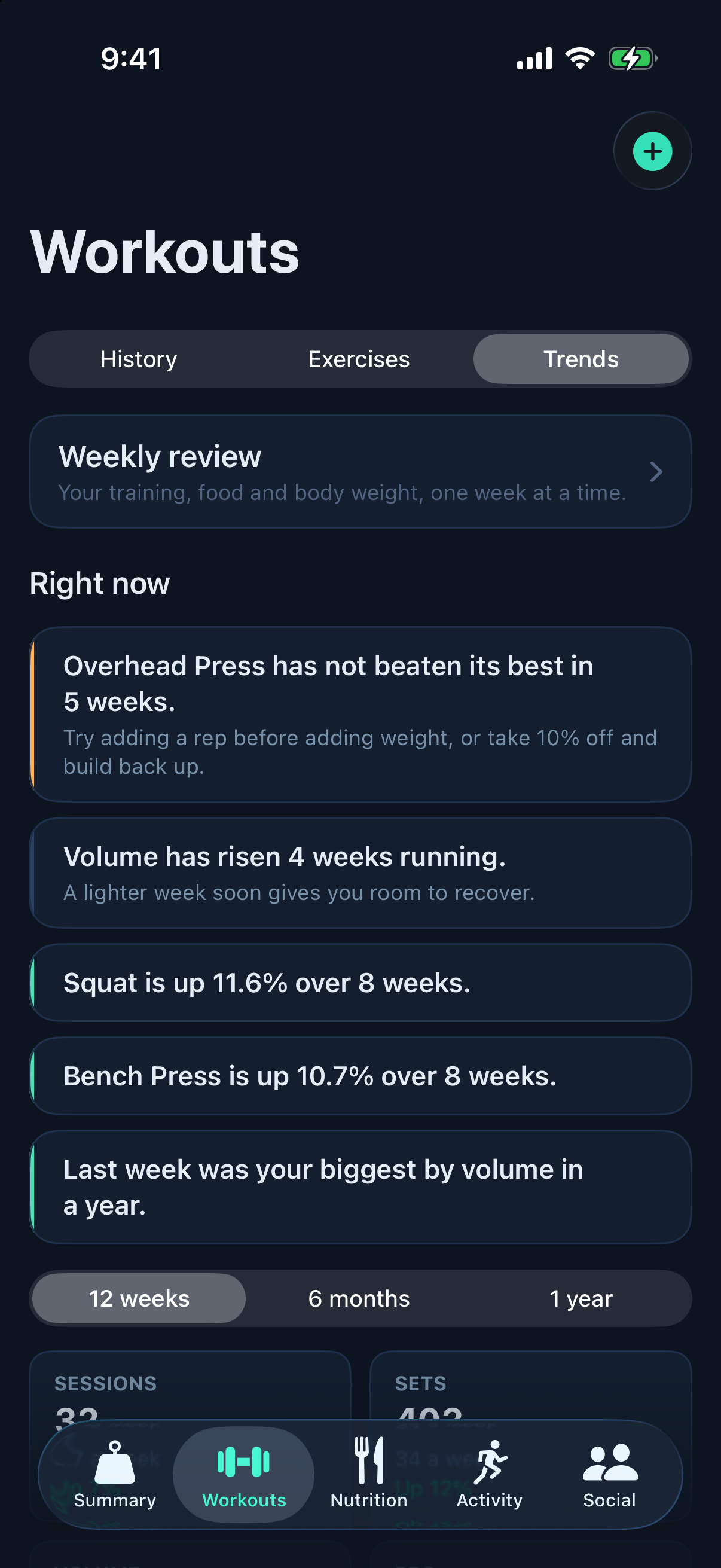
Every lift gets its own history and chart, so a good week shows up as a number rather than a feeling.

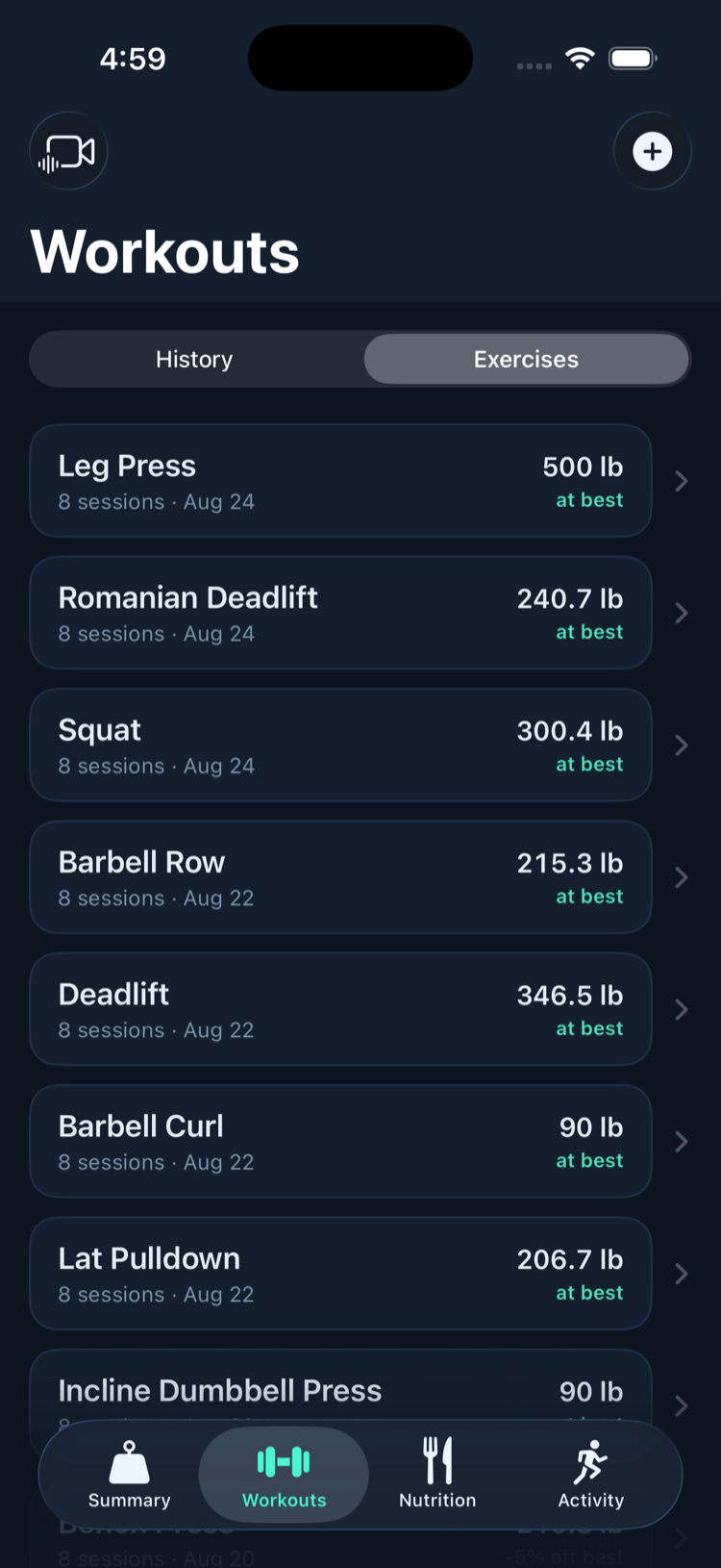
Exercise list showing each lift's best estimated one-rep max and how far the latest session is from it
Estimated 1RM for every lift, and how far your latest session is from your best.
Squat detail charting estimated one-rep max over eight weeks with personal records marked, above the heaviest weight lifted for 1, 5, 8 and 10 reps
Eight weeks of squat with every PR marked, and the most you have lifted for each rep count.
  • Estimated one-rep max

    Worked out from your sets with the Epley formula and charted session by session.

  • Top set and volume

    Switch any lift's chart between estimated 1RM, heaviest set and total volume.

  • Personal records

    PRs are marked automatically, and every lift shows how far your latest session is from your best.

  • Rep maxes

    Every lift lists the heaviest weight you have lifted for each number of reps.

  • Every session, set by set

    Each workout keeps its sets, reps, rest times, volume and gym, ready to look back on.

iPhone, in testing

Live set analysis

Film a set and the app counts it for you. For now it is in testing on one account.

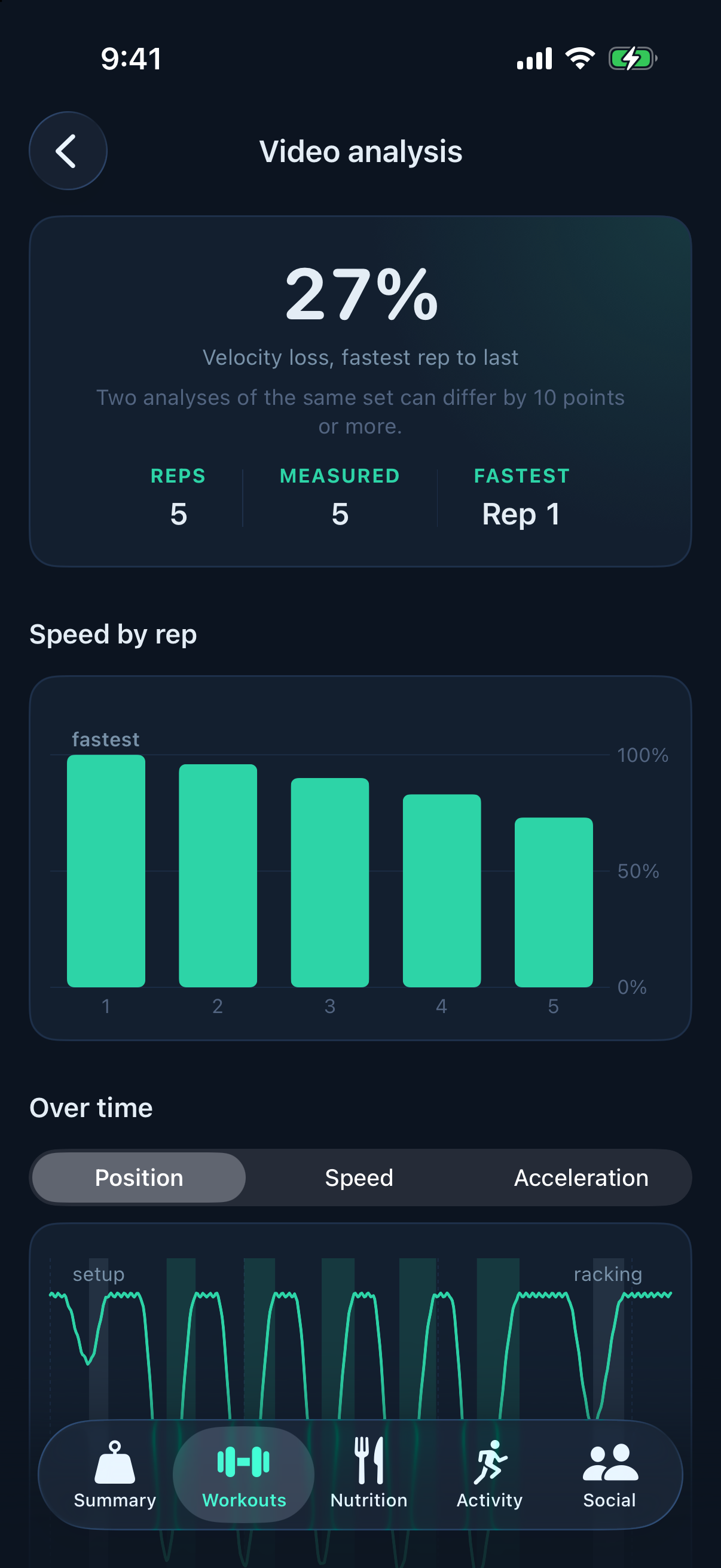
Video analysis of one set: a 27% velocity loss from the fastest rep to the last, a bar for each of five reps' speed, and the lift's position over time
A set’s video analysis: each rep’s speed, and how much the reps slowed by the end.
  • Counts while you lift

    Stand your iPhone facing you and tap Track with camera under an exercise. The app counts each rep as you lift and logs the set with its weight and reps when you stop.

  • Checked rep by rep

    After the set, the recording is reviewed one rep at a time. If the review's count is different, the set is updated to match, unless you have edited it in the meantime.

  • Stays on the right arm

    Every few seconds the app checks that it is following you and the arm doing the work. If it picked the wrong person or arm, it switches, and the count catches up.

  • Learns your gym

    The first set of an exercise in a workout teaches the app how to track that exercise where you train. Your next sets of it start with the tracking that counted it right.

  • Speed by rep

    A set with an analysis shows how much your reps slowed from the fastest to the last, and how fast each rep moved, in the app and on the web.

  • Asks first

    Nothing from the camera leaves your iPhone until you agree in the app. The phone deletes its recording once the review is back.

iPhone and web

Nutrition and energy

Log what you eat in a few taps and see it against what you burn.

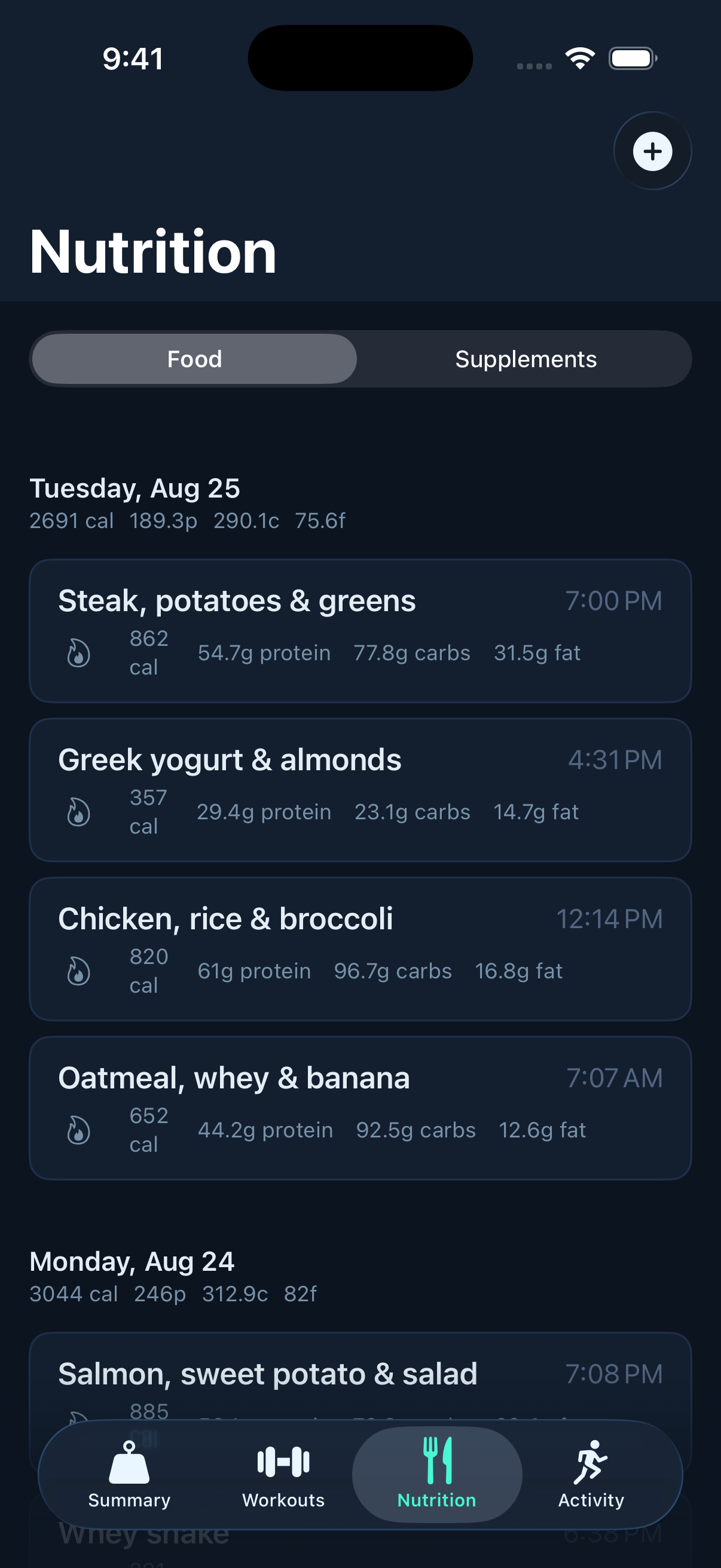
Nutrition log for one day: each meal with its calories, protein, carbs and fat, and the day's totals
Every meal with its macros, totalled per day.
Daily energy balance: calories in, calories out, the day's macros, and 7- and 30-day averages
Calories in against your basal rate and Apple Health activity, averaged over 7 and 30 days.
  • Food and supplements

    Log meals by hand with suggestions from what you have eaten before, and track supplements with their doses. Every day shows its calories, protein, carbs and fat.

  • Amherst dining menu

    At Amherst College, the day's dining hall menus open inside the food log. Pick what is on your plate and set the servings, and each dish is logged with its calories and macros. A dish whose published figures look wrong opens for you to check first.

  • Daily energy balance

    Calories in against calories out: your basal metabolic rate from your weigh-ins plus the active energy Apple Health recorded, with 7- and 30-day averages over the days you logged.

iPhone

Reminders

A nudge when a habit slips. They come from your own iPhone, so nothing is sent anywhere to make them.

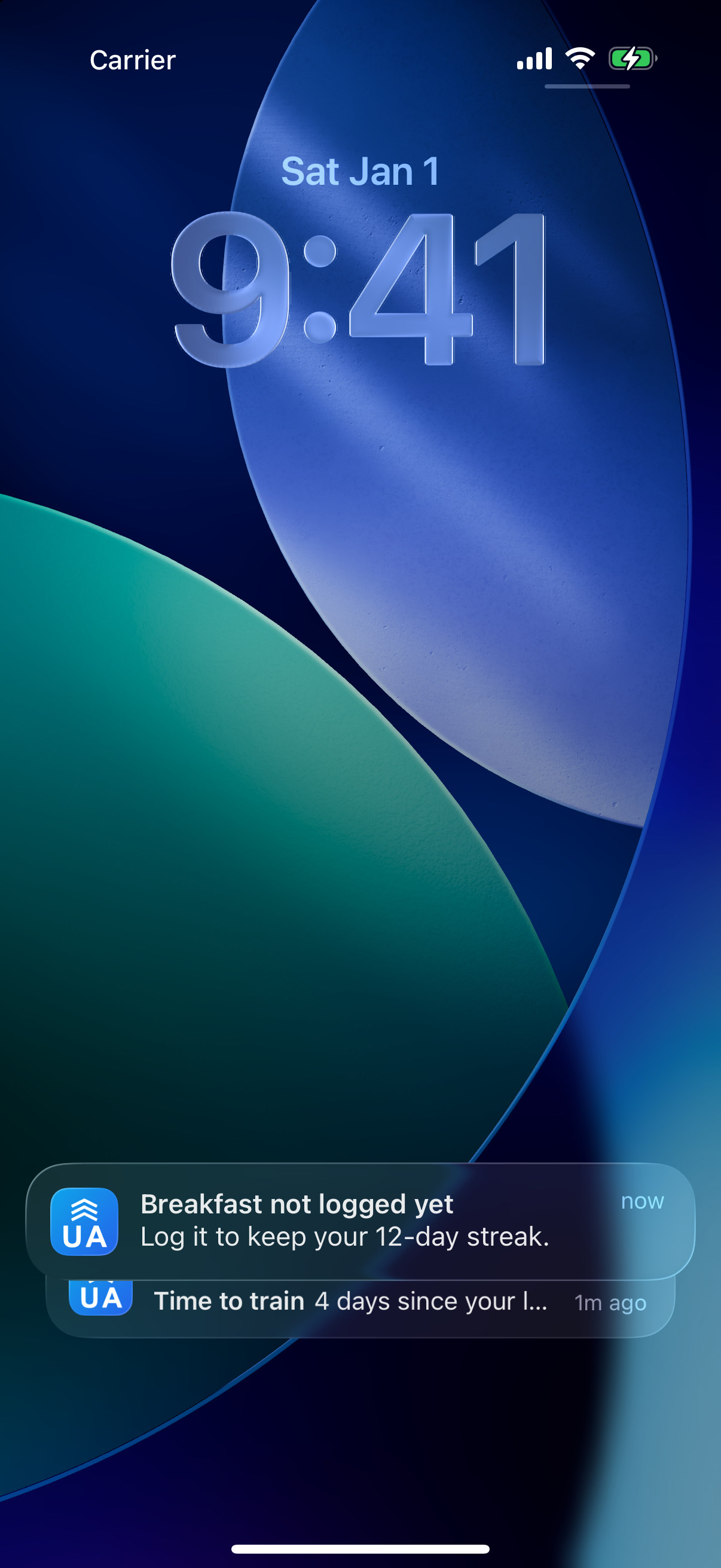
iPhone lock screen with two reminders from UA Strength: Time to train, 4 days since your last session, and Breakfast not logged yet, log it to keep your 12-day streak
Reminders when you have gone longer than usual without a session, and after a meal you usually log.
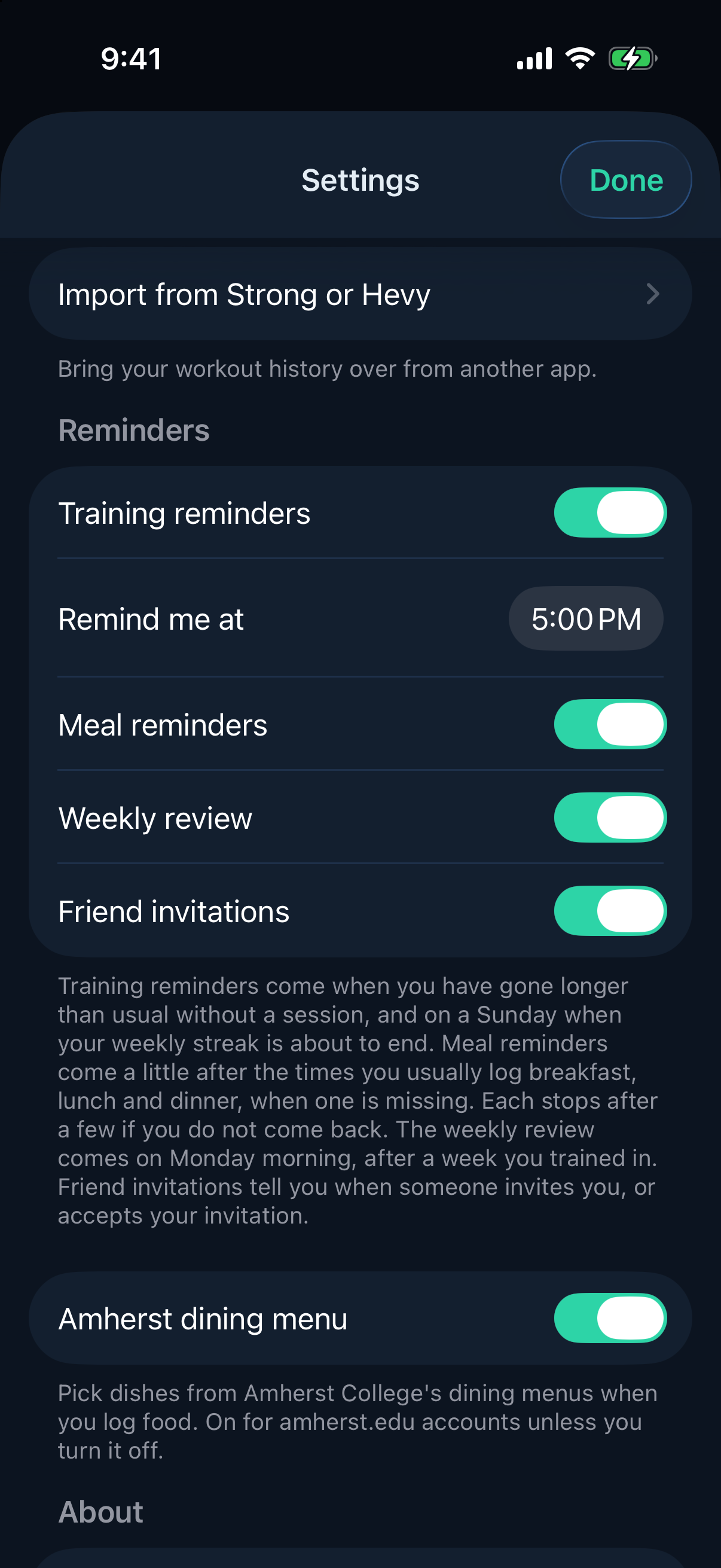
Reminders in Settings: switches for training reminders with a time of day, meal reminders, the weekly review and friend invitations, above a note on when each comes
A switch for each kind of reminder. They stop by themselves after a few.
  • When you miss the gym

    A reminder when you have gone longer than you usually do between sessions, at the time of day you choose.

  • Your weekly streak

    On the Sunday a run of training weeks is about to end, one reminder that a session that day keeps it going.

  • Each meal at its usual time

    Breakfast, lunch and dinner are followed separately. When one you usually log is missing a little after your usual time for it, you are asked about that one.

  • They stop by themselves

    Each lapse gets a few reminders, and the last one says so. After that there are none until you log again. Each kind has its own switch.

Imported on iPhone, shown on both

Apple Health

The iPhone app brings in what Apple Health already knows, so you never type it twice. Turn on Save Workouts to Health to add completed iPhone workouts there as strength training.

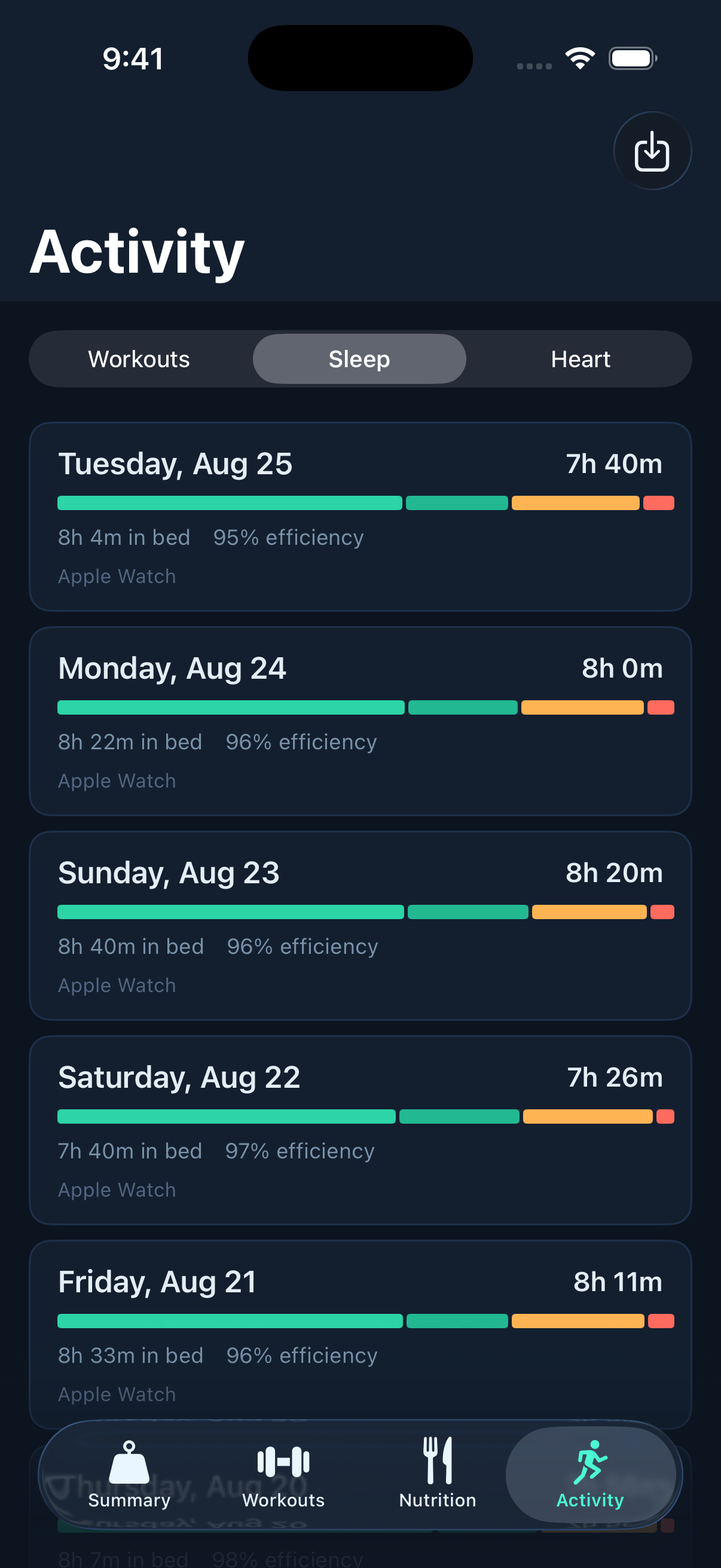
Sleep history showing stage breakdown, time in bed and sleep efficiency per night
Sleep stages and efficiency, imported from Apple Health.
  • Sleep

    Each night's sleep stages, time in bed and sleep efficiency.

  • Heart health

    Resting heart rate and heart rate variability, day by day.

  • Workouts and activity

    Runs, rides and every other workout in Apple Health, plus each day's active energy for the energy balance.

  • Smart-scale weigh-ins

    Switch on the import and readings from any scale that syncs to Apple Health arrive by themselves, with duplicates and implausible readings skipped.

iPhone and web

Training partners

Follow the people you lift with. Sharing stays off until you turn it on.

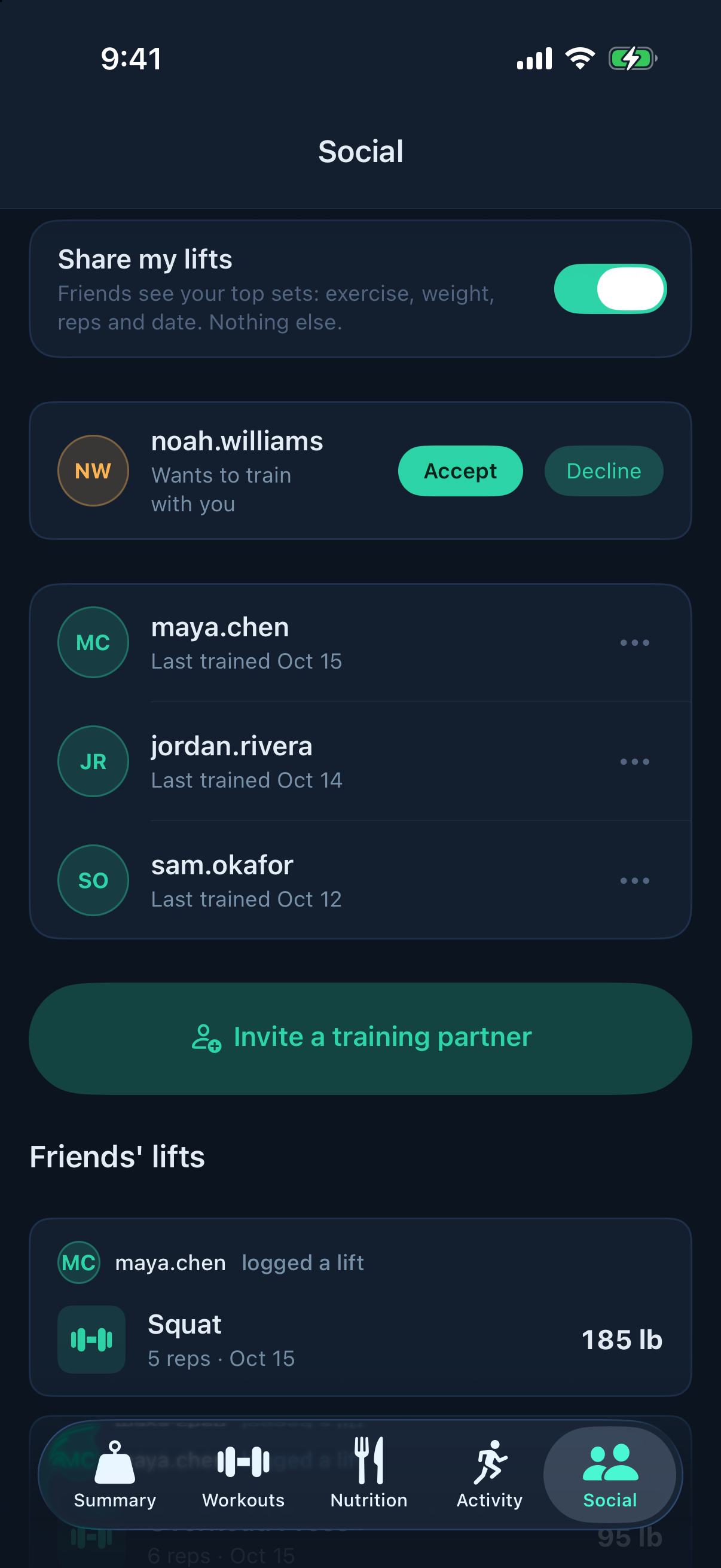
Social tab with sharing switched on, an invitation from a training partner, three friends and the start of their lifts
Training partners: invitations, friends, and the top sets they share.
  • Invite a partner

    Send an invitation by email, and they accept or decline it in the app.

  • Friends' lifts

    See your friends' top sets from the last 90 days and when each of them last trained, while your own sharing is on.

  • Share only your lifts

    Friends see your top sets and nothing else: never your food, sleep, heart or weight data.

iPhone and web

iPhone and web, online or off

One account, two complete apps, and neither needs a connection to log.

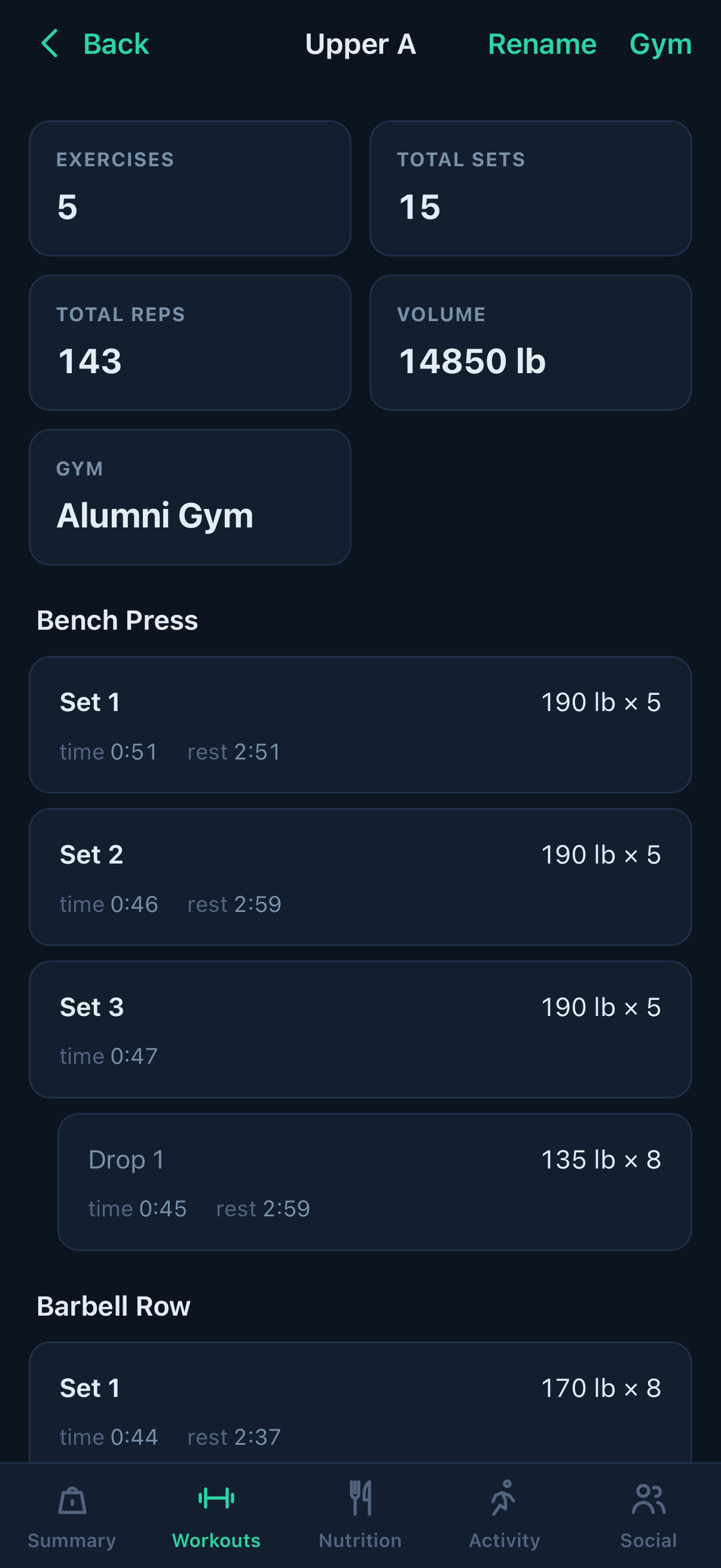
The web app showing one workout set by set, including a drop set, with set times and rests
Your history in the web app, set by set, drop sets included.
  • A native iPhone app

    Built in Swift and SwiftUI, saving every change on the device first.

  • The whole app in a browser

    Every tab the iPhone has, on this site. It installs like an app and opens even with no connection.

  • Works with no signal

    Gyms have bad reception. Changes save on the device straight away and sync once the connection comes back.

  • Always in step

    Log a set on your phone and it appears on the web, and the other way round. Twenty kinds of data, from sets to sleep, stay in sync.

iPhone and web

Privacy and security

Training and health data deserve care, so protection is built into every layer, down to the database.

No passwords

Sign in with Apple or Google. Both are checked directly against Apple's and Google's signing keys, with no third-party sign-in SDK.

Enforced by the database

Every table that holds training, food or health data has Postgres row-level security forced on, so the database itself decides whose rows a request can see.

Sessions out of reach

On the web your session lives in secure, httpOnly cookies that no script on the page can read.

Leave whenever you like

Delete your account from Settings and your data is deleted from the server, then from backups as they age out.

With an AI assistant

Ask in your own words. It reads and logs for you.

With UA Strength Premium, connect Claude or another MCP client and approve what it may see. After that you can ask about your training and food in plain words. Here is what it does with a few real requests.

Log my lunch from Betty's: the burrito bowl and a scoop of jasmine rice.
What it doesReads today's lunch menu and finds both dishes, each with the serving size its figures are for. It scales them to the portion you describe, says which portion it assumed, logs them and tells you the day's running total. If the nightly audit has corrected the hall's figure for the rice, it logs the corrected one.
Did my sleep this week show up in my squats?
What it doesReads your sleep and your workouts for the same days, set by set, and compares the two. It can read your training but never change it.
What's high in protein at Frost tomorrow?
What it doesReads tomorrow's Frost menu, which Amherst publishes about two weeks ahead, and picks out what fits, with calories and macros per serving.
You logged that shake twice. Take one off.
What it doesRemoves the duplicate, because it made that entry within the last 24 hours. An entry you logged yourself in the app stays as it is, and it tells you so.

It sees only what you allowed when you connected it, and the only things it can write are food and supplement entries. Every change it makes is listed in your agent activity, and any of them can be undone there.

Premium, set up on the web

AI assistant access

Part of UA Strength Premium. Connect Claude or any other MCP client and let it read your data and log meals for you, under rules you set.

17 tools over MCP

Assistants can read your workouts, food, sleep, heart health, active energy and weigh-ins, check the dining hall menu, look foods up in the food catalogue, and log food and supplements.

Sign in, no keys to paste

Assistants connect through OAuth 2.1: they register themselves, you sign in, and a consent screen shows exactly what they are asking for before you allow it.

Or use an API key

Create a scoped key for scripts and other tools, and revoke it whenever you like. A documented REST API sits alongside MCP.

Narrow write access

Assistants can only add food and supplement entries, and can only correct entries they made themselves, within 24 hours.

Audited and undoable

Every change an assistant makes, and every attempt that was refused, is listed in your agent activity, and any change can be undone there.

Early access

Log your next workout with UA Strength.

UA Strength is in early access and open to anyone while places last. Five College students (Amherst, Hampshire, Mount Holyoke, Smith, and UMass Amherst) can always join. The iPhone app is in beta on TestFlight, and the web app runs in any modern browser. There is no Android app yet. On Android, use the web app.